In today’s fast-evolving financial landscape, tax consultants play a critical role in ensuring businesses remain compliant while optimizing their tax liabilities. They deal with salary structures, statutory deductions, income tax filings, reimbursements, benefits, and ever-changing government regulations.
But as businesses scale, so does the complexity of payroll and tax management. Manual spreadsheets, repetitive calculations, and constant regulation updates make it nearly impossible for tax consultants to stay efficient and error-free.
This is where modern payroll software — like CrmLeaf Payroll — becomes a transformative tool. It automates the entire payroll lifecycle, enhances compliance accuracy, and provides real-time insights, helping tax consultants move from being reactive to strategic advisors.
In this comprehensive guide, we’ll explore how payroll software changes the life of a tax consultant — improving productivity, accuracy, compliance, and client satisfaction.
Eliminates Manual Payroll Hassles
For decades, payroll processing meant navigating endless spreadsheets, verifying attendance, calculating deductions, and applying tax rules manually. It was time-consuming, error-prone, and mentally exhausting.
With Payroll Software for Tax Consultants:
- Automated Payroll Runs: Set schedules and let the system process salaries, deductions, and bonuses automatically.
- Pre-Configured Rules: Define salary structures, tax slabs, and deductions once — the software does the rest every month.
- Error-Free Processing: CrmLeaf’s automation eliminates manual calculation mistakes, ensuring 100% accuracy.
Result: Tax consultants spend less time crunching numbers and more time on strategic planning, client advisories, and business growth.
Automates Compliance and Tax Regulations
Tax laws are dynamic — with frequent updates in TDS rates, EPF, ESI, gratuity, or professional tax. Staying current manually is nearly impossible for consultants managing multiple clients.
CrmLeaf Payroll Keeps You Compliant Automatically:
- Real-Time Updates: The system is auto-updated with the latest government rules and tax amendments.
- Region-Specific Customization: Easily configure compliance settings for different states or countries.
- Pre-Filled Forms and Returns: Generate TDS statements, Form 16, and statutory filings in seconds.
No more compliance stress. CrmLeaf ensures every payroll aligns with current tax norms — reducing legal risks and saving consultants from penalties or rework.
Streamlines Multi-Client Management
A tax consultant’s workload is rarely limited to a single organization. Managing payroll for multiple clients means handling diverse pay structures, compliance needs, and reporting formats.
How Payroll Software Simplifies Multi-Client Operations:
- Centralized Dashboard: View all clients’ payroll data from one secure dashboard.
- Client-Specific Rules: Configure unique salary templates and compliance settings per client.
- Switch Effortlessly: Toggle between different client payrolls in a few clicks without confusion.
CrmLeaf Payroll allows consultants to manage multiple clients simultaneously, improving efficiency and reducing the risk of errors from juggling different data sources.
Enhances Accuracy in Tax Filings
For a tax consultant, accuracy isn’t optional — it’s the foundation of trust. Payroll software ensures consistency across all calculations and eliminates manual discrepancies.
Accuracy Benefits with CrmLeaf Payroll:
- Automated Tax Computation: Automatically calculates tax withholdings, exemptions, and deductions.
- Validation Checks: Flags anomalies before payroll is finalized.
- Integrated Tax Reports: Syncs payroll data directly with accounting and tax systems.
By ensuring every figure aligns perfectly, consultants can file accurate returns, avoid audits, and maintain flawless client records.
Provides Real-Time Reports and Analytics
Traditional payroll tools only process payments; modern payroll platforms like CrmLeaf deliver actionable insights.
Key Reporting Features:
- Customizable Reports: Generate payroll summaries, tax liabilities, and year-end financial statements in real time.
- Trend Analysis: Track employee costs, tax liabilities, and benefits distributions over time.
- Forecasting Tools: Anticipate future tax implications and help clients plan proactively.
For consultants, this means transforming from a compliance manager into a data-driven financial advisor — offering smarter recommendations backed by real-time analytics.
Strengthens Data Security and Confidentiality
Payroll and tax data are highly sensitive — containing bank details, PANs, salary information, and identification documents. A single leak can destroy client trust.
CrmLeaf Payroll’s Security Protocols Include:
- Bank-Grade Encryption: Protects data in transit and at rest.
- Role-Based Access Controls: Restrict access by user role (consultant, accountant, admin, etc.).
- Audit Trails: Keep a full log of every activity for transparency and accountability.
- Cloud Backup & Recovery: Prevents data loss and ensures business continuity.
By using secure payroll software, tax consultants safeguard not just data — but their reputation and client trust.
Boosts Productivity and Saves Time
Manual payroll operations can consume 60–70% of a tax consultant’s monthly workload. Payroll software drastically reduces that time.
Productivity Gains:
- Automated Payroll Runs: Execute multiple client payrolls simultaneously.
- One-Click Payslips: Generate, download, or email payslips automatically.
- Task Reminders: Get alerts for compliance deadlines and tax filings.
Time Saved = Higher Earnings + Less Stress.
Consultants can reinvest this time in acquiring new clients, upselling advisory services, or simply maintaining a healthier work-life balance.
Improves Client Communication and Transparency
Clients expect transparency — they want to see how salaries, deductions, and taxes are being managed. Payroll software helps consultants deliver this easily.
With CrmLeaf Payroll:
- Client Dashboards: Share real-time payroll summaries and reports.
- Custom Reports: Offer branded, professionally formatted statements for each client.
- Automated Notifications: Keep clients informed about filings, due dates, and approvals.
Transparent reporting builds long-term client trust and differentiates a consultant from competitors relying on outdated manual systems.
Supports Remote and Hybrid Work Models
Post-pandemic, many tax consultants operate remotely or manage distributed clients. Cloud-based payroll systems ensure accessibility anytime, anywhere.
Cloud Payroll Benefits:
- Work from Anywhere: Access client data securely from any device.
- Team Collaboration: Multiple team members can collaborate in real time.
- 24/7 Availability: No dependency on physical office infrastructure.
CrmLeaf Payroll enables consultants to maintain flexibility without compromising data integrity or efficiency.
Enables Scalability and Growth
As a tax consultant’s client base grows, manual payroll processes can’t scale. Payroll software, however, grows with your business.
CrmLeaf Scalability Features:
- Unlimited Client Accounts: Manage multiple organizations simultaneously.
- Custom Configurations: Adapt salary rules, benefits, and tax structures as clients evolve.
- Integration Ready: Connect with CRMs, accounting platforms, and HR tools seamlessly.
With CrmLeaf, consultants can scale operations effortlessly without hiring extra staff or increasing overhead costs.
Reduces Legal and Financial Risks
Non-compliance with statutory regulations can result in hefty fines and reputational damage. Payroll automation minimizes these risks.
CrmLeaf Risk Management Tools:
- Built-in Compliance Tracker: Automatically checks for missing filings or underpayments.
- Digital Record-Keeping: Maintains proof of all transactions for audits.
- Alert Mechanism: Warns about upcoming deadlines or discrepancies.
With proactive compliance monitoring, consultants protect both their clients and their practice from legal trouble.
Creates a Better Work-Life Balance
One of the most overlooked benefits of payroll automation is the personal relief it offers. Consultants often work late nights during tax season — but automation changes that.
Lifestyle Benefits:
- No repetitive manual tasks.
- Reduced stress from compliance tracking.
- More predictable workflows.
By cutting tedious administrative work, payroll software gives tax consultants their time and peace of mind back.
Why CrmLeaf Payroll Is the Best Choice for Tax Consultants
CrmLeaf Payroll isn’t just another payroll tool — it’s a complete payroll and compliance management ecosystem tailored for consultants, accountants, and financial experts.
Key Differentiators:
- Integrated CRM + Payroll: Manage clients, payrolls, and communications in one unified system.
- AI-Powered Insights: Get recommendations for compliance accuracy and tax optimization.
- Custom Branding: White-label options to present payroll reports under your consulting firm’s name.
- Seamless Integrations: Connect with QuickBooks, Xero, Tally, and ERP systems.
- Global Compliance Support: Handle multi-country payrolls with localized rules.
With CrmLeaf Payroll, tax consultants can simplify, scale, and shine.
Conclusion
The life of a tax consultant has evolved from manual number-crunching to data-driven strategy — and payroll software is at the heart of that transformation.
By embracing automation through platforms like CrmLeaf Payroll, consultants can:
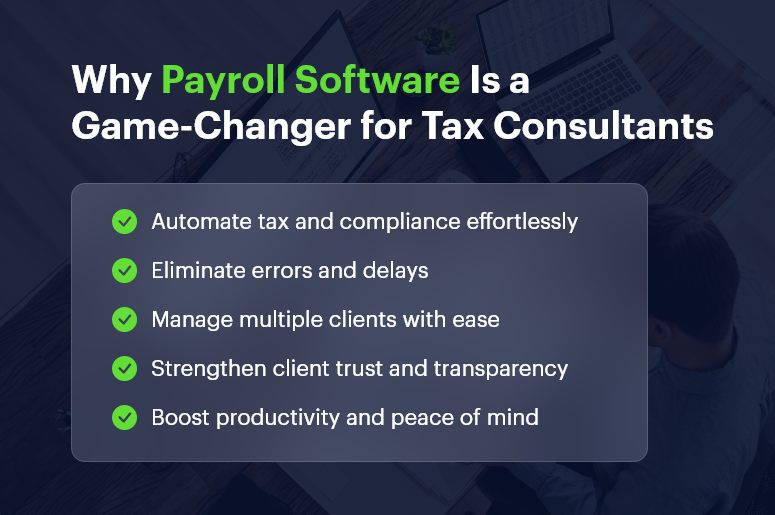
- Automate compliance and tax filing
- Improve accuracy and reduce risks
- Boost productivity and scalability
- Strengthen client trust
- Enjoy better work-life balance
In short, payroll software doesn’t just simplify operations — it redefines how tax consultants deliver value.
Frequently Asked Questions
1. What is payroll software, and why do tax consultants need it?
Payroll software automates salary processing, tax deductions, and compliance management. For tax consultants, it simplifies complex calculations, ensures error-free tax filings, and saves significant time.
With payroll software like CrmLeaf Payroll, consultants can manage multiple clients effortlessly while maintaining 100% compliance accuracy.
2. How does payroll software help tax consultants with compliance?
Payroll systems automatically update themselves with the latest government tax laws, TDS rules, EPF, and ESI regulations. This means tax consultants don’t have to manually track compliance changes — the software ensures every payroll adheres to current legal requirements.
3. Can payroll software handle multiple clients for tax consultants?
Yes. CrmLeaf Payroll allows consultants to manage multiple clients simultaneously from a single dashboard. Each client can have customized salary structures, deductions, and reporting settings, making multi-client management seamless and organized.
4. Does payroll software reduce human errors in tax filings?
Absolutely. Payroll software automates calculations for income tax, deductions, reimbursements, and allowances. This eliminates manual data entry mistakes and ensures that every filing is precise, compliant, and audit-ready.
5. How does payroll automation improve client relationships for tax consultants?
By providing transparent reports, real-time dashboards, and accurate payslips, consultants can build stronger trust with their clients. CrmLeaf Payroll also enables consultants to share compliance reports and tax summaries in branded, professional formats — enhancing credibility and client satisfaction.
6. Is payroll software secure enough to handle sensitive financial data?
Yes. Modern payroll systems, especially CrmLeaf Payroll, use bank-grade encryption, role-based access control, and secure cloud backup systems. This ensures complete confidentiality and protection of client payroll and tax data from unauthorized access or breaches.
7. Can payroll software integrate with accounting and CRM systems?
Definitely. CrmLeaf Payroll integrates seamlessly with popular accounting software like Tally, QuickBooks, and Xero, as well as CRM tools. This integration enables automatic data synchronization, improving efficiency and reducing duplicate data entry.
8. Does payroll software save time for tax consultants?
Yes, it saves considerable time. Automated payroll processing, report generation, and compliance tracking drastically reduce manual effort. Consultants can process payrolls faster and focus more on strategic advisory services instead of repetitive administrative tasks.
9. How does payroll software help during audits or tax assessments?
Payroll software keeps detailed digital records of every transaction, deduction, and tax filing. During audits or assessments, consultants can easily access historical data and generate reports, making the process smooth and transparent.
10. Is payroll software suitable for both small and large tax consulting firms?
Yes. CrmLeaf Payroll is scalable — it suits individual consultants, small tax firms, and large accounting organizations. The platform grows with your business, allowing you to handle unlimited clients, employees, and compliance types as your firm expands.