Payroll Compliance 101: Key Laws Every Business Must Follow

Navigating payroll compliance is no longer just a back-office task — it’s a critical business responsibility that impacts employee trust, legal standing, and your bottom line. Whether you’re a startup or scaling enterprise, payroll compliance mistakes can cost you more than money — they can damage reputation, team morale, and operational efficiency.

In this guide, you’ll learn the must-know payroll laws, real-world scenarios, and how to stay compliant without draining time or resources. With help from platforms like CRMLeaf’s CRM + ERP, compliance becomes part of your workflow, not a fire drill.

Why Payroll Compliance Matters for Modern Businesses

Payroll compliance isn’t just about paying employees on time — it’s about doing it legally, accurately, and consistently. As your business grows, payroll gets more complex, and so do the risks.

Here’s why it matters:

  • Avoid Costly Penalties: Missing tax deadlines or misclassifying employees can lead to thousands in fines and interest. Staying compliant protects your finances and keeps audits away.
  • Maintain Employee Trust: Mistakes in paychecks — from incorrect deductions to late deposits — can erode employee satisfaction and increase churn.
  • Meet Industry-Specific Requirements: From construction to tech to retail, every industry has different labor laws. Staying up-to-date keeps you compliant and competitive.
  • Enable Better Growth Decisions: When your payroll data is accurate and compliant, you can plan for raises, new hires, and expansions with confidence.
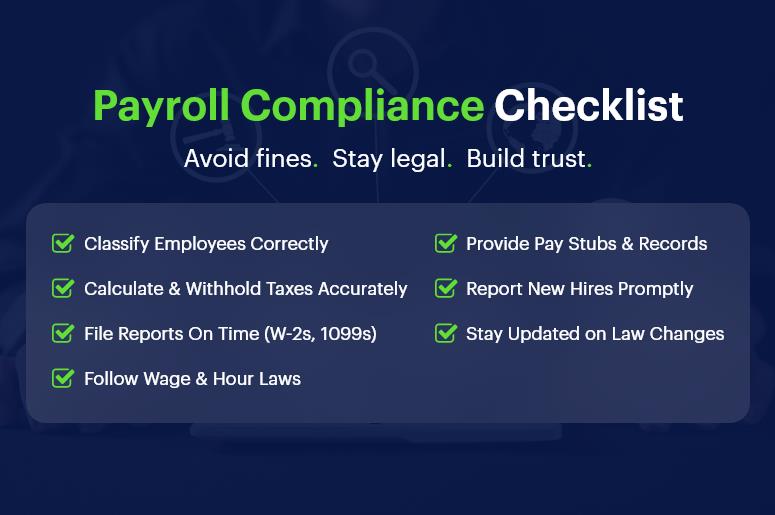
Payroll Compliance Checklist

Common Payroll Compliance Challenges & How to Solve Them

1. Misclassifying Employees and Contractors

Improper classification affects taxes, benefits, and legal exposure. Classifying a contractor as a full-time employee (or vice versa) may trigger audits and legal consequences. Always verify roles with federal and state guidelines.

2. Inaccurate Tax Withholding and Reporting

Incorrect tax calculations can result in underpayment or overpayment. Businesses must stay current on IRS guidelines and local tax requirements. Automation through payroll compliance software reduces these risks.

3. Late or Missed Filings

Missing deadlines for payroll taxes, W-2s, or 1099s leads to penalties. Build a tax calendar, set automated reminders, or better yet — let your CRM + ERP do it for you.

4. Ignoring Wage and Hour Laws

From overtime rules to minimum wage updates, compliance means aligning your payment structure with ever-changing labor laws. Integrating legal updates into your payroll engine helps you stay alert.

5. Poor Recordkeeping

Federal law requires you to retain payroll records for several years. A centralized system ensures you don’t misplace vital documents during audits.

6. Failing to Provide Proper Pay Stubs

Employees have the right to transparent, itemized pay stubs. A payroll compliance checklist should include pay stub generation that complies with your jurisdiction.

7. Noncompliance with New Hire Reporting

Each state mandates reporting new hires within a specific time window. Ignoring this can result in steep fines. Automated systems ensure timely compliance.

8. Overlooking Multi-State Regulations

Operating in multiple states? You’ll face different wage laws, tax codes, and filing rules. A unified platform helps you customize compliance settings by location.

9. Failing to Keep Up with Tax Law Changes

Tax codes evolve constantly. Manual tracking invites errors. Instead, use a CRM + ERP system that integrates real-time tax law updates and reflects them in payroll.

10. Ignoring Employee Classification Updates

Employees move between roles or contract statuses. Keeping classifications updated ensures ongoing compliance. Make this part of your HR workflow.

Best Practices to Master Payroll Compliance

Automate Where Possible

Automated systems ensure accurate tax withholdings, filing deadlines, and paycheck calculations — freeing up HR for strategic work.

Create a Payroll Compliance Checklist

Outline your responsibilities, including reporting, documentation, audits, and tax deadlines. Review and update this list quarterly.

Audit Your Payroll Process Regularly

Set up periodic internal audits to identify errors early. Validate timesheets, benefits, classifications, and tax rates.

Stay Educated on Compliance Requirements

Subscribe to HR and legal newsletters. Join webinars. Platforms like the IRS and Department of Labor provide free, updated guidance.

Work with Integrated Platforms

A disconnected spreadsheet can’t notify you of rule changes. Use CRMLeaf’s CRM + ERP to ensure HR, payroll, and compliance are all on the same page.

Keep Digital Records

Store pay stubs, tax filings, and employee contracts in a secure digital hub. Back them up and restrict access using role-based permissions.

Align HR and Payroll Teams

Regular syncs between HR and payroll ensure employee data — from bank accounts to benefits — remains accurate and compliant.

Customer Success Story

For example, SwiftHire Solutions, a mid-sized recruitment firm, used CRMLeaf’s automated payroll compliance features to eliminate filing errors and avoid $10,000+ in penalties over two years.

By centralizing HR, payroll, and employee data into one platform, they slashed admin time by 40% and stayed audit-ready during an IRS check. Their HR team can now focus on talent and engagement instead of tax forms.

Key Takeaways & Closing

Payroll compliance is critical to your legal, financial, and operational success. Mistakes are costly — both in money and morale.

Integrated tools like CRMLeaf’s CRM + ERP help automate, monitor, and update compliance processes, reducing errors and saving time.

Compliance isn’t a one-time job. You need a system that evolves with laws and your business.

What to do next:

  • Audit your current payroll workflow. Identify risks, gaps, or outdated processes.
  • Create a compliance checklist. Use it monthly.
  • Book a demo of CRMLeaf to see automation in action.
The Future of Payroll: Automation, Compliance, and Employee Experience

The future of payroll is no longer a distant vision — it’s unfolding right now. From increased government scrutiny to rising employee expectations, payroll has become a strategic function rather than just a back-office process. According to Deloitte, nearly 60% of businesses are actively modernizing payroll to improve accuracy, compliance, and employee satisfaction.

If you’re still using spreadsheets or disconnected systems, you’re likely wasting time, exposing your business to compliance risks, and frustrating your team. But there’s good news — with the right tools and automation in place, payroll can become one of your most reliable, efficient, and employee-friendly workflows.

In this blog, we’ll explore:

  • Why the future of payroll is central to business growth
  • The biggest changes shaping payroll across industries
  • Practical steps to improve your payroll process today
  • How automation and a CRM + ERP platform like CRMLeaf can help

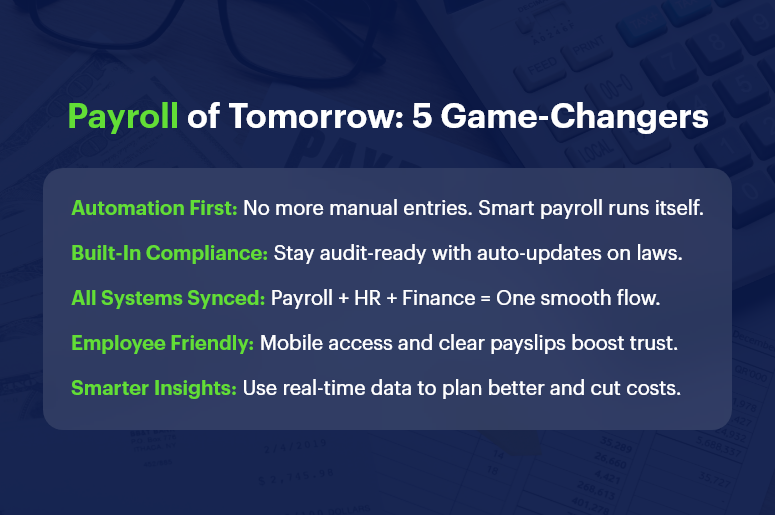
Payroll of Tomorrow 5 Game Changers

Why Payroll Modernization Matters for Your Business

Payroll isn’t just about cutting checks. It’s a direct reflection of how your business values accuracy, compliance, and employee well-being. Here’s why modernizing payroll is non-negotiable in today’s business environment:

  • High Stakes Compliance: Labor laws, tax codes, and statutory deductions change frequently. Missing a deadline or misclassifying an employee can lead to audits, penalties, or lawsuits. Automated payroll systems help you stay compliant, error-free, and audit-ready.
  • Employee Trust and Satisfaction: When employees are paid late or inaccurately, trust erodes. A well-run, transparent payroll process reinforces a culture of reliability and professionalism. This is critical for retention, especially in high-turnover industries like retail, construction, and logistics.
  • Operational Efficiency: Manual payroll is time-consuming and error-prone. Integrating payroll with your HR and finance systems eliminates duplicate work and frees up your team to focus on strategy.
  • Scalability for Growth: As your business grows, payroll becomes more complex. New tax jurisdictions, contract types, and benefit structures emerge. The future of payroll lies in scalable solutions that grow with you.

What’s Driving the Future of Payroll?

Several factors are transforming how businesses handle payroll:

1. Payroll Automation is Now Essential

  • Eliminates repetitive tasks: Automation reduces the need for manual data entry, making pay cycles faster and more reliable.
  • Improves real-time accuracy: Errors are flagged instantly, ensuring accurate deductions, reimbursements, and benefits.
  • Reduces cost and labor: Businesses save money on admin hours and reduce payroll staff burden.

2. Compliance is Getting More Complex — and Critical

  • New labor laws and tax codes are being introduced across regions.
  • Freelancers, gig workers, and remote teams add complexity.
  • Automated systems ensure that every update — from tax slabs to EPF/ESI — is handled in real time.

3. Employee Experience is Tied to Payroll

  • Transparent, on-time payments build trust.
  • Features like self-service payslip access, real-time leave tracking, and reimbursement visibility empower employees.
  • A positive payroll experience enhances engagement, especially for remote and hybrid teams.

4. Integrated Platforms Are Replacing Disconnected Tools

  • Businesses using separate apps for HR, accounting, and payroll are prone to sync errors.
  • CRM + ERP platforms like CRMLeaf centralize data, reduce friction, and enable smarter decision-making.

Practical Tips: How to Prepare for the Future of Payroll

Ready to upgrade your payroll game? Here’s how to stay ahead:

Digitize and Centralize Your Payroll Data

  • Replace spreadsheets and paper forms with a centralized digital platform.
  • Choose a solution that integrates with HR, finance, and compliance tools.

Automate Key Processes

  • Automate payslip generation, tax calculations, benefit deductions, and statutory compliance.
  • Set recurring payroll schedules and alerts to eliminate delays.

Prioritize Compliance from Day One

  • Select software that updates automatically with the latest regulations.
  • Run periodic audits to detect errors before authorities do.

Empower Employees Through Self-Service Portals

  • Give employees access to their payslips, tax declarations, and leave balances.
  • Add mobile accessibility for hybrid or field-based teams.

Track Metrics and Use Payroll Analytics

  • Monitor payroll KPIs like cycle time, error rate, and cost per payslip.
  • Use insights to forecast costs and support budget planning.

Train Your HR & Finance Teams

  • Regularly update your team on system changes and compliance requirements.
  • Invest in user training during onboarding and after major updates.

Customer Success Snapshot

For example, GreenRoots Logistics, a fast-growing transportation company, used CRMLeaf’s payroll automation tools to reduce salary processing time by 75%. They integrated timesheets, leave approvals, and compliance tracking into a single workflow — all managed from one platform. This helped them ensure 100% on-time payments and a 30% drop in payroll-related queries.

Key Takeaways: Shaping the Future of Payroll

The future of payroll demands automation, real-time compliance, and a better employee experience. Businesses that continue using outdated methods will fall behind — not just in efficiency but in trust and growth.

In summary:

  • Automation isn’t optional anymore — it’s the baseline for payroll success.
  • Compliance risks are growing — using automated systems ensures peace of mind.
  • Employee satisfaction is directly tied to their payroll experience.
  • CRM + ERP platforms like CRMLeaf offer an all-in-one solution for modern payroll challenges.

Investing in the right payroll system today will future-proof your business tomorrow.

Top Payroll Challenges Small Businesses Face — And How to Overcome Them

Managing payroll is not just about calculating salaries and hitting “send.” It’s a critical function that impacts compliance, employee trust, and business growth. Small businesses, especially, face intense pressure to get payroll right — without the luxury of large teams or expensive systems.

In this blog, we break down the top payroll challenges faced by small businesses and show you how to overcome them with modern tools, smart workflows, and streamlined systems like a CRM + ERP platform.

Why Payroll Management Deserves More Attention

If payroll feels like a back-office task, think again. For small and mid-sized businesses, payroll can make or break operations:

  • Cash flow hinges on payroll timing. If salaries are delayed or miscalculated, it can cause employee dissatisfaction and even attrition.
  • Payroll errors often trigger legal penalties. From late filings to incorrect tax calculations, non-compliance is costly.
  • Manual payroll is time-consuming and error-prone. Many small teams still rely on spreadsheets, which are simply not scalable.

Industries like retail, manufacturing, and IT services that operate with mixed or distributed workforces often find payroll particularly tricky due to varying shifts, bonuses, and legal compliance.

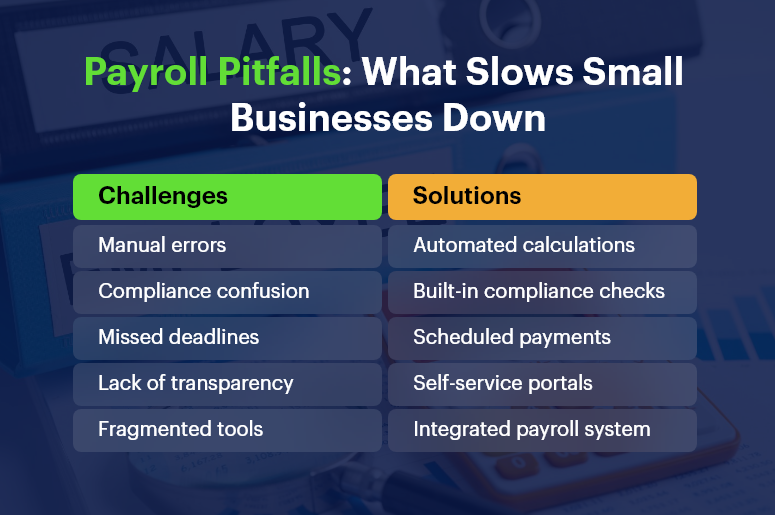
Payroll Pitfalls What Slows Small Businesses Down

The Top Payroll Challenges for Small Businesses

1. Payroll Compliance and Ever-Changing Tax Regulations

Staying compliant with local, state, and national laws is exhausting. Tax slabs change, new deductions are introduced, and local labor laws evolve regularly.

  • Failure to comply can lead to hefty fines. For example, misfiling PF or ESI returns can invite audits or penalties.
  • Keeping up with changes requires continuous monitoring. Small HR teams may not have bandwidth for this.

2. Employee Misclassification (Full-Time vs. Contractual)

Many small businesses operate with a mix of full-time, part-time, and freelance workers.

  • Incorrect classification leads to incorrect tax deductions and benefit allocations.
  • This misstep can attract government scrutiny and cause reputational damage.

3. Frequent Payroll Errors and Manual Calculations

Human errors during data entry, incorrect overtime calculations, or forgetting to update deductions can all snowball quickly.

  • Incorrect payslips break employee trust. It lowers morale and could lead to disputes.
  • Fixing payroll errors consumes time and resources, especially if discovered late.

4. Delayed Salary Disbursement

Salary delays often result from approvals stuck in email threads or cash flow uncertainty.

  • Late salaries hurt employee retention. Workers expect timely payments — especially in labor-heavy sectors.
  • It also disrupts payroll reporting and statutory submissions.

5. No Integration Between HR, Payroll, and Finance Systems

Disjointed systems mean multiple logins, repeated data entry, and no single view of employee or financial data.

  • Data silos lead to inefficiencies. You may calculate leave in one system, salary in another, and taxes manually.
  • Lack of integration affects reporting accuracy.

6. Handling Bonus, Incentive, and Variable Pay

Bonuses, commissions, and performance incentives add complexity to monthly processing.

  • Without a rule-based system, calculating variable pay is confusing and inconsistent.
  • Mistakes here affect employee motivation and tax liabilities.

7. Difficulties in Tax Filing and Year-End Reports

Many businesses struggle with last-minute data compilation during TDS filing or form generation.

  • Inaccurate tax filing risks penalties and employee dissatisfaction.
  • Manually generating Form 16 or 24Q is time-consuming.

How to Overcome These Payroll Challenges

Solving these issues starts with automation, integration, and insight. Here’s how:

Adopt a Unified Payroll Platform

Replace fragmented tools with a CRM + ERP system that integrates payroll, HR, and finance.

  • Eliminates redundant data entry across departments.
  • Ensures consistency in employee classification and tax deduction rules.

Set Payroll Rules and Templates

Use configurable salary structures and templates for roles, departments, and work types.

  • Standardization reduces calculation errors.
  • Templates ensure clarity across full-time, part-time, and freelance roles.

Automate Tax Compliance and Filing

Use payroll software that supports automatic deductions, PF/ESI calculation, and timely filings.

  • Get real-time compliance alerts.
  • Avoid end-of-quarter panic.

Enable Self-Service for Employees

Give employees access to payslips, tax details, and reimbursement updates.

  • Builds transparency and reduces admin burden.
  • Empowers employees to track earnings and deductions.

Set Clear Payroll Schedules and Workflows

Avoid delays with automated approval workflows and defined processing dates.

  • Improves coordination between HR, finance, and leadership.
  • Ensures salaries are hit on time.

Case Study

For example, a retail chain implemented an integrated payroll + HR solution to streamline monthly payouts. With automated PF/ESI calculations and integrated leave tracking, they:

  • Reduced payroll processing time by 60%
  • Avoided late filing penalties completely
  • Improved employee satisfaction and retention

Key Takeaways

  • Payroll management is more than salary disbursement — it’s a business-critical operation.
  • Manual systems increase risks and drain time for small teams.
  • Compliance, classification, and tax filing are the top pain points in small business payroll.
  • Integrated systems reduce errors, delays, and missed compliance windows.

In summary, a smart, unified payroll system can transform how small businesses manage compliance, build employee trust, and save countless hours each month. As you grow, you need processes that scale without multiplying complexity.

How to Keep Projects on Budget with Real-Time CRM Data

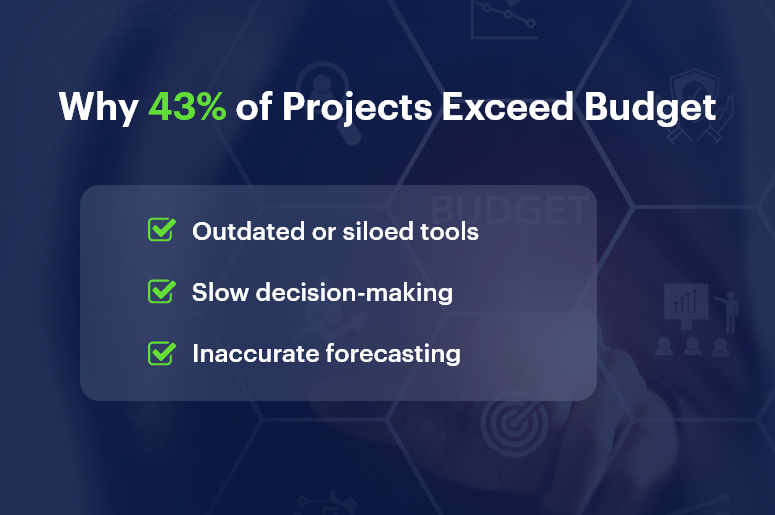
Every business wants their projects to finish on time and within budget. But according to PMI’s 2023 Pulse of the Profession report, nearly 43% of projects run over budget. That’s not just a number — it’s a serious risk. Why does this happen? Because many teams still rely on outdated tools and fragmented systems. Without real-time CRM data, they miss red flags and end up reacting too late.

In this post, you’ll discover how real-time CRM data can transform your project budget tracking. We’ll explore real-world tactics, tools, and tips to help project, finance, and operations teams stay on course — without financial surprises.

Why Budget Control Is a Must

Budget overruns don’t just eat profits — they break client trust and delay growth. For small and mid-sized businesses, every cost counts. That’s why cost control isn’t optional — it’s mission-critical.

Real-time CRM data helps you:

  • Get accurate visibility of costs and timelines
  • Make faster decisions when scope or resources shift
  • Forecast smarter using historical trends and real-time numbers

Using CRM + ERP platforms like CRMLeaf gives you a unified view—no more spreadsheet juggling or system silos.

Industries That Benefit Most

Real-time CRM data isn’t just useful — it’s a competitive edge across industries.

  • Construction: Track materials, labor, and subcontractor costs live
  • Marketing Agencies: Adjust budgets on the fly with client feedback
  • IT & Software: Align sprints and contracts with resource usage

No matter your sector, project finances improve when you go real-time.

Why 43 of Projects Exceed Budget

10 Best Practices to Stay on Budget with Real-Time CRM Data

1. Track Time & Expenses in Real Time

Capture every hour and cost instantly. With CRMLeaf, teams log time directly into the system — eliminating delays and billing errors.

2. Set Smart Budget Threshold Alerts

Use budget alerts to notify managers as spending approaches set limits. This way, you prevent overspending before it becomes a problem.

3. Monitor Budget KPIs with Dashboards

Visualize key metrics like burn rate, cost-to-date, and profit margin. Custom CRM dashboards give your team live access to project financials.

4. Integrate Sales & Project Data

When your CRM + ERP systems talk to each other, handovers are seamless. No surprises. No misaligned budgets. Just clarity.

5. Run What-If Budget Scenarios

Use CRMLeaf to simulate different project paths. What if a delay hits? What if resource costs spike? See the financial impact before it happens.

6. Align Milestones with Cost Checkpoints

Attach budget reviews to project milestones. This builds accountability and ensures you adjust based on facts — not assumptions.

7. Simplify Change Order Management

Scope changes? No problem. With real-time CRM data, every update reflects immediately in your budget tracking.

8. Standardize Budget Templates

Use CRMLeaf’s templates to kickstart planning. Avoid missed line items and start every project with a realistic budget baseline.

9. Automate Invoicing from Project Logs

Turn time entries and approved tasks into invoices — automatically. This speeds up billing and reduces revenue leakage.

10. Share a Unified View Across Teams

Finance, sales, and project managers all see the same live data. That means fewer miscommunications and tighter cost control.

Real Results: CRM Data in Action

BrightEdge Solutions, a mid-sized IT services firm, used CRMLeaf to track 10+ projects simultaneously — and stayed within 98% of budget.

Here’s what worked:

  • Real-time time logging and budget alerts
  • Dashboards to monitor burn rates daily
  • Proactive changes to avoid $20,000+ in cost overruns

The result? On-budget delivery, happier clients, and faster invoicing cycles.

Takeaways: Use Real-Time CRM Data to Stay in Control

Keeping projects on budget is no longer about guesswork — it’s about using real-time CRM data to stay one step ahead.

With CRMLeaf, you can:

  • Get instant visibility into your project financials
  • Connect teams with shared data and live dashboards
  • Stop overspending before it starts
  • Deliver projects faster and with confidence

In short, CRMLeaf helps you stay lean, agile, and profitable. It’s time to stop flying blind — and start using real-time CRM data to drive every decision.

Combining CRM and Project Management: The Best of Both Worlds

Tired of juggling CRM and project management tools? You’re not alone — and it’s draining your team’s productivity. According to Forrester, businesses lose 20-30% of revenue due to operational inefficiencies. And the root cause? Siloed tools that don’t talk to each other.

Your sales team closes deals in one system. Then your delivery team starts the project in another. The result? Miscommunication, duplicated data, missed deadlines — and frustrated clients.

Let’s change that.

This blog breaks down why combining CRM and project management is no longer optional. It’s essential. And how CRMLeaf’s CRM + ERP platform helps you bring both worlds together — effortlessly.

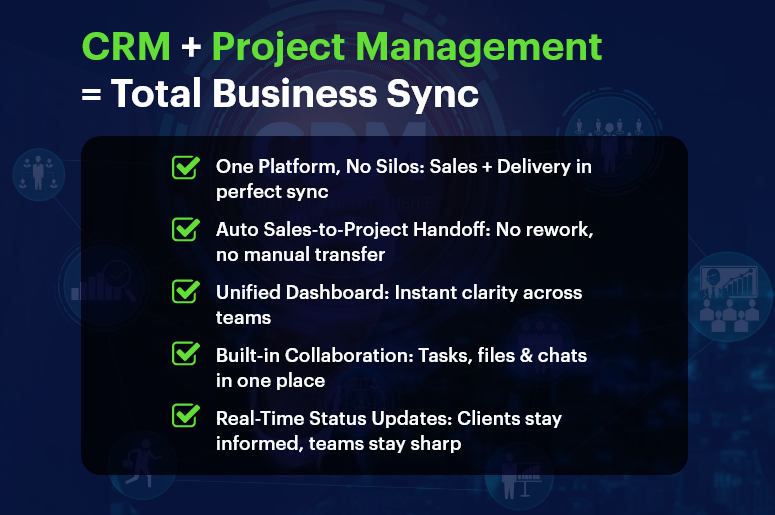
CRM Project Management Total Business Sync

Why CRM and Project Management Belong Together

As your business scales, disconnected systems slow you down. Integrating CRM and project management ensures smooth transitions, better customer experience, and improved performance across departments.

1. Say Goodbye to Data Silos

No more hunting down updates in spreadsheets or chasing team members for info. A unified platform keeps customer data and project details in one place — accessible to everyone.

2. Streamlined Sales-to-Delivery Handoff

Once the deal is closed, the project starts automatically. All client data, scope, and notes flow seamlessly from sales to operations — with no manual re-entry.

3. Boosted Customer Experience

Customers expect smooth, consistent service. A unified CRM and PM tool keeps your team aligned, so clients get timely updates and exceptional delivery.

4. One Dashboard for Everything

Sales metrics. Project timelines. Resource allocation. All in one place. Gain insights quickly, plan accurately, and make decisions faster.

5. Real Collaboration Across Teams

Sales, support, operations, and marketing all work in one system. Shared notes, tasks, files, and timelines keep everyone in sync — from lead to delivery.

Who Benefits Most?

Industries thriving with CRM and project management integration include:

  • SaaS companies
  • Consulting firms
  • Construction and real estate teams
  • Professional services
  • Marketing and creative agencies
  • Manufacturing businesses

Best Practices for Combining CRM and Project Management

Want to make integration truly effective? Don’t just install tools. Build processes. Here’s how:

1. Define the Full Customer Journey

Map every touchpoint — from first contact to post-project follow-up. This creates clarity across teams and improves your customer lifecycle management.

2. Standardize Workflows

Automate recurring actions. When a deal closes, your platform can auto-create project plans, assign tasks, and notify the right people instantly.

3. Control Access Smartly

Not everyone needs everything. Use role-based permissions to protect sensitive CRM data and streamline user experience.

4. Use Unified Dashboards

Combine sales KPIs (like conversion rate) with project KPIs (like time-to-delivery) for a complete view of performance.

5. Automate Status Updates

Keep teams and clients in the loop. Trigger alerts for milestones, overdue tasks, and new assignments automatically.

6. Centralize All Communication

Ditch the email chaos. Store project briefs, files, conversations, and customer feedback in one place.

7. Track Time and Budget Together

Sync time tracking and cost estimation with CRM data. That means accurate invoices, tight scopes, and better profitability.

8. Prioritize Simplicity

Tools don’t help if no one uses them. Pick a platform like CRMLeaf that’s intuitive, fast to learn, and built for real business use.

Customer Success Snapshot

  • Company: BrightEdge Creative
  • Industry: Digital Marketing Agency

Before CRMLeaf:

  • Used 3+ tools: a CRM, spreadsheets, and Slack
  • Projects delayed due to miscommunication
  • Clients were frustrated by inconsistent updates

After CRMLeaf:

  • Leads now convert to projects automatically
  • Teams collaborate in one workspace
  • Delivery time improved by 40%
  • Client satisfaction grew by 25%

CRMLeaf helped us turn chaos into coordination. We no longer worry about things slipping through the cracks.” — Operations Lead, BrightEdge Creative

Key Takeaways

Combining CRM and project management gives your team a competitive edge. Instead of juggling tools, you align departments, speed up delivery, and improve client outcomes.

With CRMLeaf’s CRM + ERP platform, you get:

  • Seamless sales-to-project handoffs
  • Centralized collaboration and reporting
  • Real-time visibility across teams
  • Less admin work — and more results

Don’t settle for disconnected tools. Unite your workflows with a single, powerful platform.

Case Study: From Excel Sheets to Seamless CRM Operations

Still managing your customer data and operations in Excel sheets? You’re not alone. But in today’s fast-paced business world, that choice is costing more than you think. In fact, a study by Ventana Research found that 44% of businesses report spreadsheet errors monthly, and most don’t even realize it until it’s too late. As your business grows, you need accuracy, automation, and visibility — not clunky files that break when shared. That’s where seamless CRM operations come in. This blog will show you:

  • Why Excel fails growing businesses
  • How a CRM + ERP system transforms day-to-day operations
  • Step-by-step guidance to switch with confidence
  • A real-world case study on how CRMLeaf made it happen

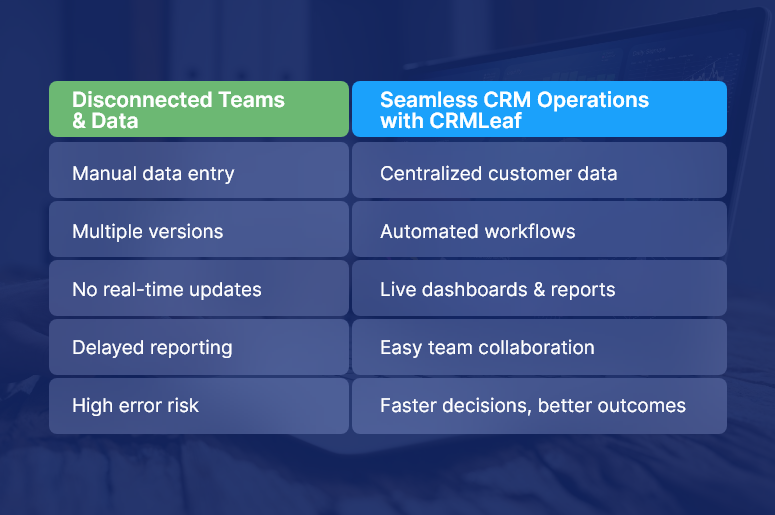
Disconnected Teams & Data

Why Businesses Must Ditch Excel for Seamless CRM Operations

Let’s get to the heart of the matter — why Excel isn’t enough anymore.

Here’s why growing teams in sales, HR, finance, and operations must evolve beyond spreadsheets:

1. Manual work eats up your time

When you’re manually entering leads, updating deal statuses, or building reports in Excel, it consumes hours weekly. These repetitive tasks lower productivity and create room for error.

2. Data is disconnected and siloed

Sales, marketing, HR, and finance all use different Excel files. That means zero real-time collaboration and no single source of truth — a big issue when making data-driven decisions.

3. Visibility and forecasting are limited

Excel lacks live dashboards. If you want insights into deal pipelines, customer trends, or team workloads, you’re stuck refreshing pivot tables and combining CSVs.

4. Version control is a nightmare

Who owns the latest file? Is it in email, Drive, or on someone’s desktop? Without real-time sync and permissions, collaboration becomes chaotic.

5. Security and compliance are risky

Excel sheets can be copied, deleted, or emailed without traceability. That’s a problem if you handle sensitive customer, financial, or employee data.

Best Practices: How to Transition to Seamless CRM Operations

Making the shift from Excel to seamless CRM operations doesn’t have to be complex. With the right platform (like CRMLeaf) and approach, you’ll streamline your processes without losing control.

Here’s how to do it step by step:

1. Conduct a Data Audit

List all your current Excel workflows — customer lists, sales pipelines, HR onboarding, task tracking, etc.

✅ Identify what’s outdated, duplicated, or misaligned. This sets the foundation for a clean transition.

2. Set Clear Migration Goals

Ask: Why are we switching to a CRM?

✅ It might be to reduce manual tasks, get real-time reports, or automate customer touchpoints. Define KPIs so you can measure success.

3. Choose the Right CRM + ERP Tool

Not all tools are created equal. Choose a platform like CRMLeaf that combines CRM with ERP features like invoicing, HR, project tracking, and analytics.

✅ This ensures your operations run on a single, connected system.

4. Involve Stakeholders Across Teams

Don’t go it alone. Bring in department heads early to understand their needs.

✅ This promotes user adoption and prevents mismatches during rollout.

5. Clean and Import Your Excel Data

Use CRMLeaf’s Excel import wizard to map your columns, validate entries, and upload clean data in minutes.

✅ Fix errors and duplicates before they become a problem inside the system.

6. Automate Workflows Immediately

Start small — like auto-assigning leads, triggering follow-ups, or setting task reminders.

✅ This creates quick wins and shows your team how the CRM saves them time.

7. Customize Dashboards for Each Role

Create dashboards that highlight what matters to each team: sales forecasts, HR onboarding status, or financial KPIs.

✅ Everyone gets clarity without digging through tabs.

8. Track Adoption and Keep Training Ongoing

Monitor login activity and usage reports to spot gaps.

✅ Offer refresher sessions and keep collecting feedback to fine-tune usage.

Customer Success Snapshot: From Files to Flow

For example, TechNova Solutions, a mid-sized IT service provider, was managing leads, customer tickets, and project updates across 12 Excel files and 3 disconnected apps.

Here’s how CRMLeaf helped:

  • Replaced spreadsheets with a centralized CRM dashboard
  • Automated follow-ups, invoicing, and ticket escalations
  • Integrated sales, HR, and project data into one real-time system

The results:

  • 50% faster response times to customer queries
  • Saved 20+ hours/week in admin work
  • Improved cash flow with faster billing cycles

CRMLeaf made it easy. We moved from spreadsheet chaos to seamless CRM operations in under 30 days.” — Operations Director, TechNova Solutions

Key Takeaways: You’re One Step Away from Operational Clarity

Let’s recap what we covered:

  • Excel sheets break down at scale — they’re prone to error, disconnected, and lack automation.
  • Seamless CRM operations bring control, visibility, and automation across your business.
  • CRMLeaf’s CRM + ERP platform simplifies the transition and keeps all your departments in sync.

By following the step-by-step guide above, you can confidently migrate without disruption.